Shared limits
How to limit YouTube time across your child’s devices
Create one YouTube group, add the TV and mobile YouTube apps to it, and set a daily group allowance. With the same synced child profile active across devices, both apps contribute to that allowance. Forty minutes on TV plus twenty on a tablet uses sixty minutes of the group’s budget.
Why use a group?
YouTube on TV and YouTube on mobile have different Android app identifiers. A single per-app rule does not automatically combine them. A Group explicitly includes both variants, so their usage can share one allowance. An overall Device budget is different: other counted apps also consume it.
Set up one shared YouTube group
- Create the group on a phone or tablet.
In the child’s active profile, open Groups, choose +, name it YouTube, and create it. Open the group, choose Add App, select the installed YouTube app, and save. Set Screen Time Limit to your daily allowance, such as one hour.
- Back up the profile, then load it on the TV.
On the phone or tablet, open Settings → tvusage remote → Backup Current → Backup. On the linked TV, select that same profile under Profiles and choose Activate, or Restore if it is already active. Wait for it to load.
- Add the TV app to that existing group.
Open the synced YouTube group on the TV, choose Apps, select TV YouTube, and Save. The TV picker retains the mobile app already in the group. Save the profile to Remote, then restore that same profile on the phone or tablet.
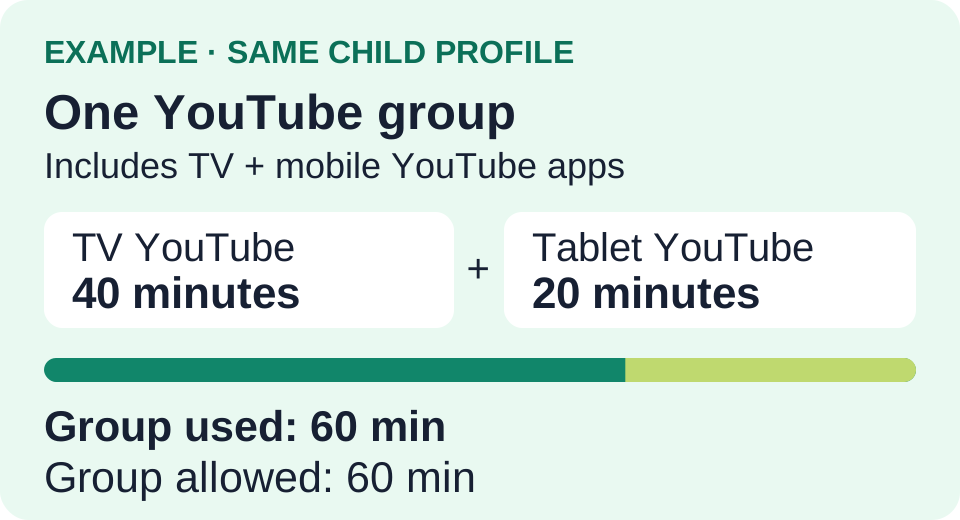
Keep both apps in the group
After adding the TV app, avoid re-saving this group’s app membership from the mobile picker: it can remove members that are not installed on that device. Make membership changes on the TV instead. Keep devices online; shared totals can lag while usage syncs. Check the group rule and selected profile if a session is not restricted as expected.